
AWDL: The Silent Latency Killer on macOS
TL;DR: If you’re experiencing random lag spikes on your Mac over Wi-Fi, AWDL (AirDrop’s wireless protocol) is likely the cause. I wrote a daemon that keeps it disabled permanently - even after sleep/wake cycles.
The Problem
I was getting frustrating mouse stickiness when using Synergy by Symless to share my keyboard and mouse across machines. The cursor would feel responsive for a few seconds, then stutter like skipped frames, then recover. Classic symptoms of network jitter.
I also noticed the same issue with Sunshine/Apollo game streaming - input lag that came and went in a regular pattern.
I wrote a quick Python script to measure LAN latency to my router every 200ms. The results were damning:
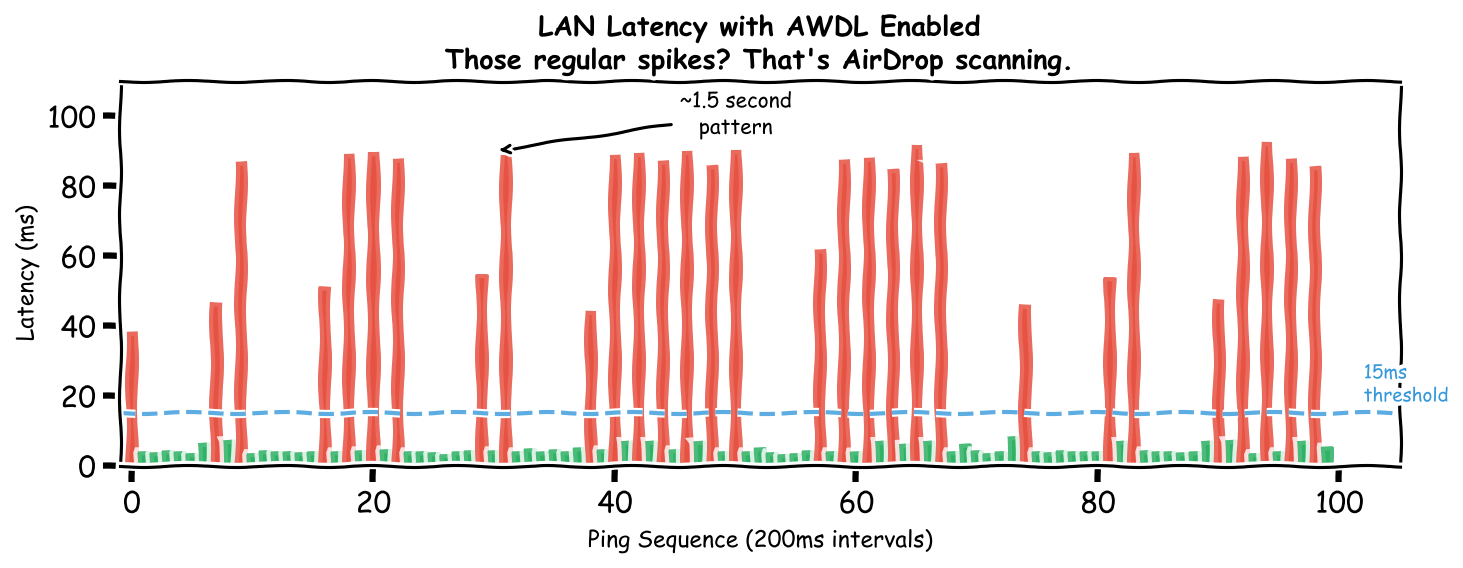
Those red spikes hitting 80-90ms every ~1.5 seconds? That’s not network congestion. That pattern is too regular, too predictable. Something on my Mac was interrupting the network stack like clockwork.
The Culprit: AWDL
AWDL (Apple Wireless Direct Link) is the protocol behind AirDrop, AirPlay, and Handoff. It works by periodically switching your Wi-Fi radio to a different channel to scan for nearby Apple devices.
During those scans, your normal Wi-Fi traffic waits. For ~80-90ms. Every 1-2 seconds.
The Evidence
I wrote a test script that toggled various macOS network settings and measured the impact:
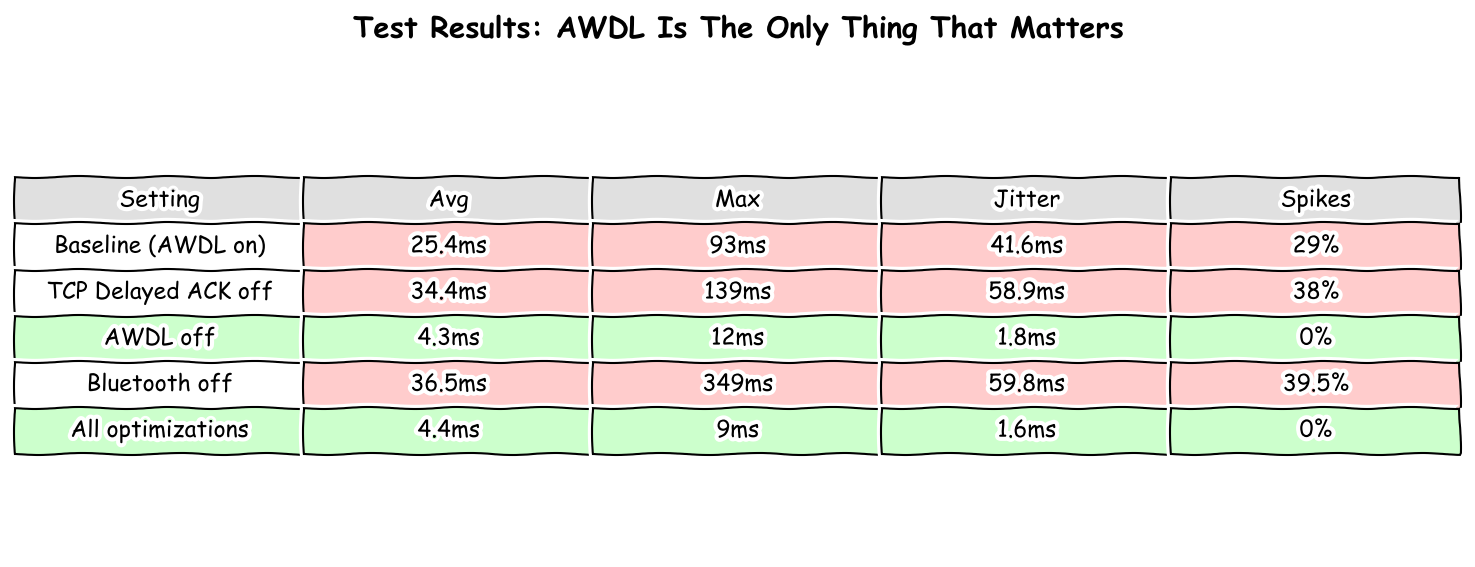
| Setting | Avg Latency | Max Latency | Jitter | Spikes (>15ms) |
|---|---|---|---|---|
| Baseline (AWDL on) | 25.4ms | 93ms | 41.6ms | 29% |
| TCP Delayed ACK off | 34.4ms | 139ms | 58.9ms | 38% |
| AWDL off | 4.3ms | 12ms | 1.8ms | 0% |
| Bluetooth off | 36.5ms | 349ms | 59.8ms | 39.5% |
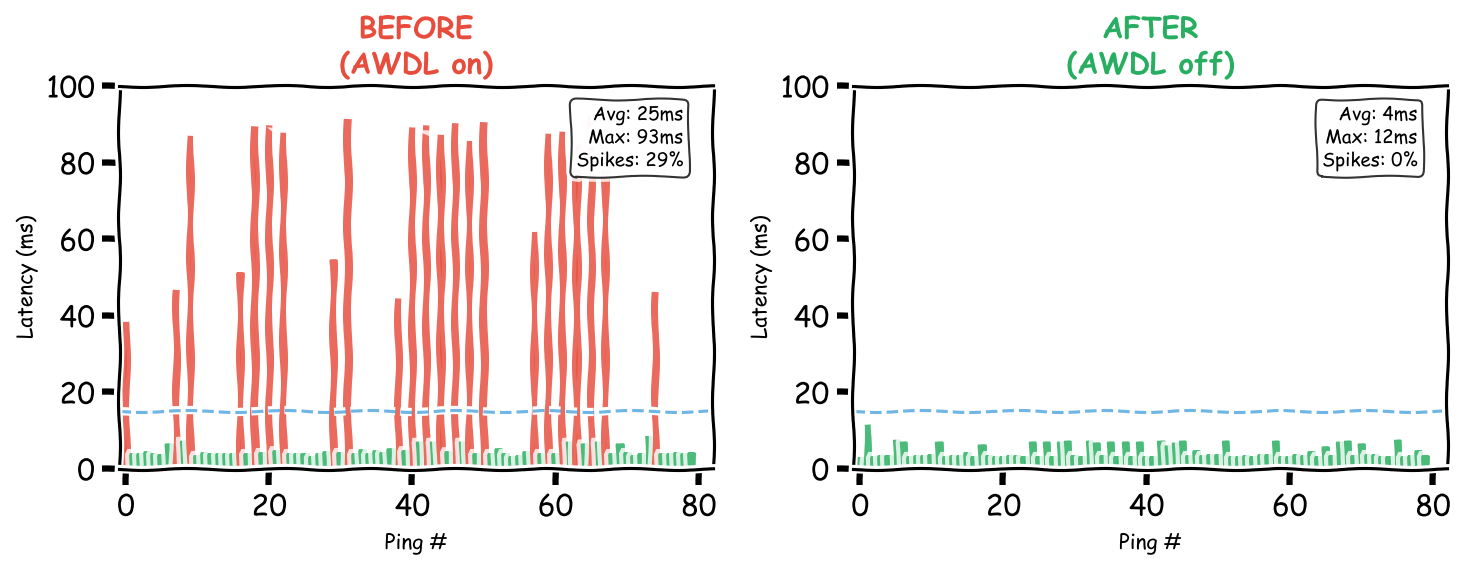
AWDL was the only setting that mattered. Disabling it:
- 6x lower average latency
- 8x lower max latency
- 23x lower jitter
- Zero spikes
The Fix
Quick fix (temporary)
sudo ifconfig awdl0 down
This works immediately but macOS re-enables AWDL after every sleep/wake cycle.
Permanent fix (runs at boot)
I wrote a guard script that monitors AWDL and disables it whenever macOS turns it back on. Install it as a LaunchDaemon so it starts automatically at boot:
# Download the scripts
git clone https://github.com/adamlovattdevops/slow-wifi.git
cd slow-wifi

# Install
sudo cp awdl-guard.sh /usr/local/bin/
sudo chmod +x /usr/local/bin/awdl-guard.sh
sudo cp com.local.awdl-guard.plist /Library/LaunchDaemons/
sudo launchctl load /Library/LaunchDaemons/com.local.awdl-guard.plist
That’s it. The script now runs at every boot and catches AWDL reactivating within 5 seconds of sleep/wake.
What I tried first (doesn’t work)
Before writing the daemon, I tried:
- System Settings → AirDrop & Handoff → set to “No One” / Off
defaults writecommands to disable AirDrop and Handoff
Both work initially. But close your laptop lid, open it again, and AWDL is back. macOS re-enables it on every sleep/wake cycle regardless of your preferences. The daemon is the only fix that actually sticks.
Reverting (if needed)
sudo launchctl unload /Library/LaunchDaemons/com.local.awdl-guard.plist
sudo rm /Library/LaunchDaemons/com.local.awdl-guard.plist /usr/local/bin/awdl-guard.sh
sudo ifconfig awdl0 up
Human Perception Context
Why does this matter? Here’s where those latencies sit relative to human perception:
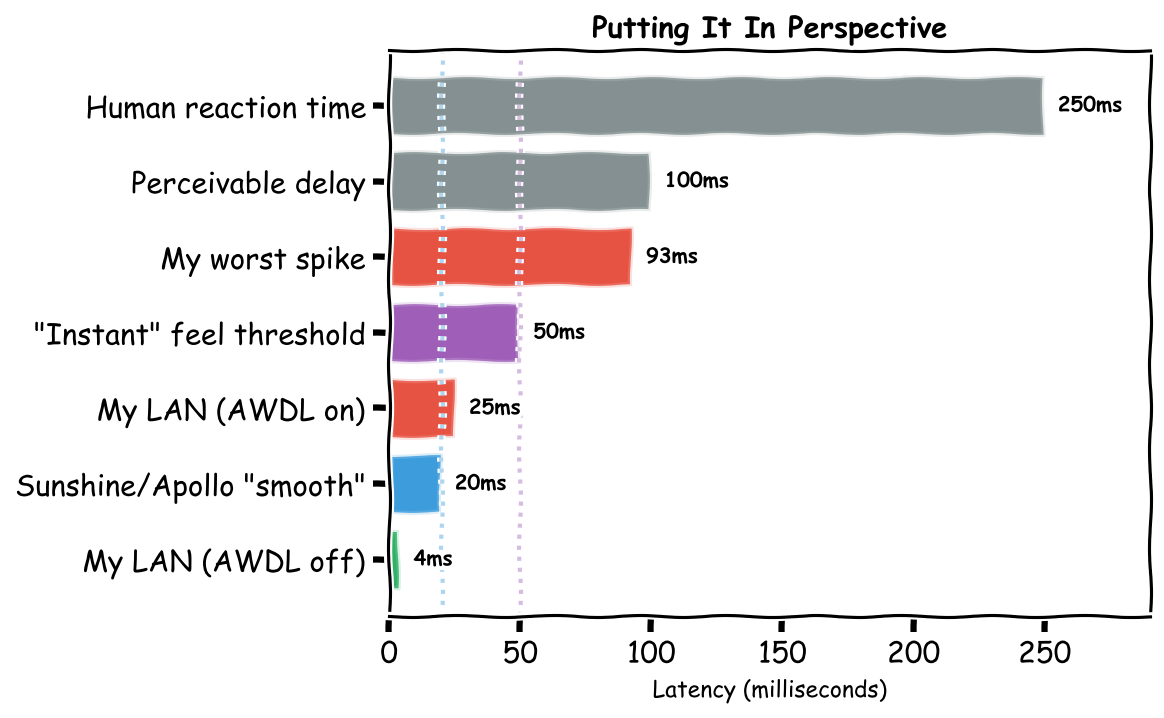
- 4ms (AWDL off): Imperceptible, feels like local
- 25ms (AWDL on average): Noticeable for fast interactions
- 93ms (AWDL spike): Clearly laggy, breaks flow state
- 100ms: Threshold where delay becomes consciously perceivable
- 250ms: Average human visual reaction time
For game streaming and tools like Synergy, the rule of thumb is <20ms for “smooth” and <50ms for “usable”. With AWDL on, 29% of my packets exceeded the smooth threshold. With it off, zero did.
The Scripts
All scripts are on GitHub:
awdl-guard.sh+com.local.awdl-guard.plist- The fix (daemon + LaunchDaemon config)jitter-check.py- The diagnostic tool I used to find the problem. Run it against any IP to see if you have the same issue:
python3 jitter-check.py 192.168.1.1 # your router or any LAN device
If you see regular spikes every 1-2 seconds, AWDL is probably your culprit.
Conclusion
Apple’s seamless ecosystem comes at a hidden cost: AWDL constantly hijacks your Wi-Fi radio to scan for nearby devices, causing 80-90ms latency spikes multiple times per second. System Settings won’t save you - macOS re-enables AWDL after every sleep. The daemon approach is the only permanent fix I’ve found.
If you’re not using AirDrop, AirPlay, or Handoff, install the guard and enjoy your lag-free Sunshine streams, Synergy sessions, and video calls.
Tested on macOS Sequoia. Your mileage may vary on other versions.