
Hijacking the Steam Deck's On-Screen Keyboard
TL;DR: Steam’s on-screen keyboard types letters fine, but it exposes no Ctrl, Alt, Super, Esc or F-keys at all, so no shortcut is reachable — and it only exists while Steam is running. I wrote a replacement that registers a virtual input device on /dev/uinput and remapped the hardware keyboard button to summon it. Code: better-handheld-keyboard.
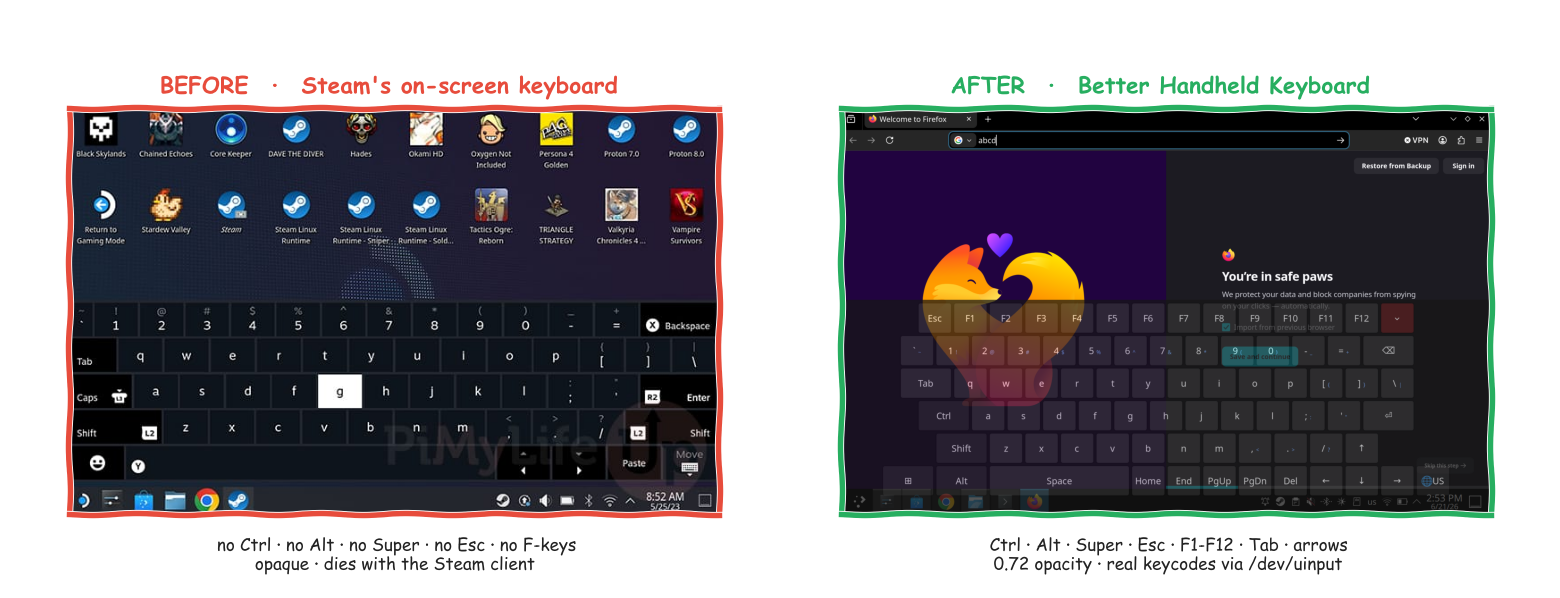
Left: Pi My Life Up. Right: mine, typing into Firefox.
The stock keyboard
Desktop Mode on a SteamOS handheld is a full KDE Plasma desktop — Plasma 6 since SteamOS 3.7, on Wayland by default since 3.8.10 (before that, X11 unless you switched it yourself). The only text input you get without plugging in USB is Steam’s on-screen keyboard, summoned with Steam + X.
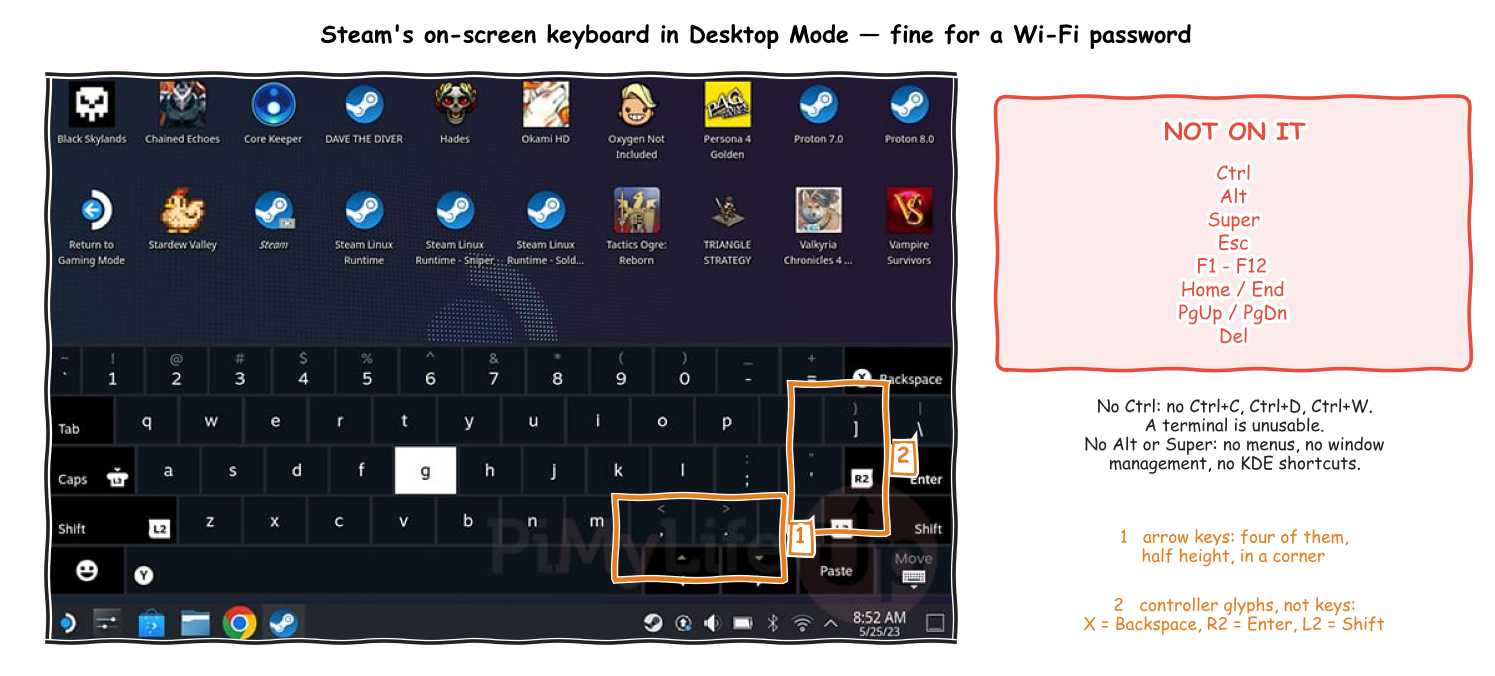
The gaps aren’t subtle:
- No
Ctrl. NoCtrl+C, noCtrl+D, noCtrl+W. Letters reach the terminal; the moment you need to interrupt something, you’re stuck. - No
Alt, noSuper. No menu traversal, no window management, no KDE shortcuts. - No
Esc, noF1–F12, noHome/End, noPgUp/PgDn, noDel. Refresh in Firefox, escape a dialog, jump to the start of a line — all unreachable. - Arrow keys exist, barely. Four half-height keys in the bottom-right corner, next to
PasteandMove. - Keys that aren’t keys.
X,R2andL2glyphs sit onBackspace,EnterandShift— it’s a controller UI wearing a keyboard’s clothes. - Opaque, and half the screen. You can’t see the thing you’re typing into.
- It needs Steam. It’s a Steam client window (
steamwebhelper). No Steam process, no keyboard.
These are documented complaints going back to launch, not my discovery. It’s a keyboard designed for entering a password into a login box, sat in front of a full KDE desktop.
Why a replacement instead of a patch
The keys aren’t the interesting part — where the event is born is.
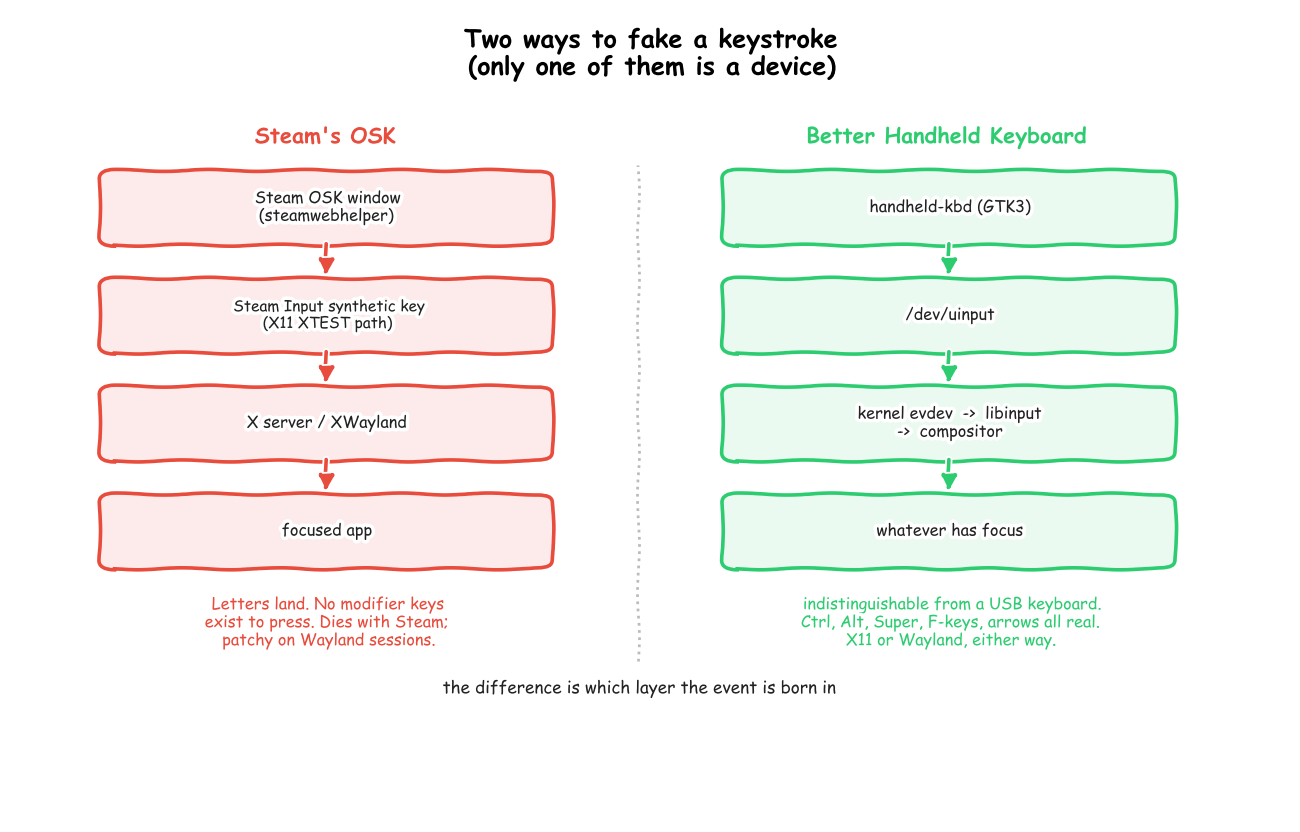
Steam’s OSK is a Steam client window whose input goes out through Steam Input’s synthetic-input path, which on Linux is built on X11 (XTEST). Two practical consequences, neither of which is fixable from the outside:
- Nothing to press. The layout simply has no modifier keys on it. Whatever the injection path can do, you can’t ask it for
Ctrl+C. - It’s Steam’s, not the system’s. It lives and dies with the Steam client, and Steam Input’s behaviour on Wayland sessions is patchy enough that a shim exists purely to feed Steam the
XTESTinterface it expects — extest, which reimplements XTEST by creating uinput devices and isLD_PRELOADed into Steam. Worth noting where that lands: someone else independently concluded the fix was to stop synthesising X11 events and become a kernel device instead.
Mine goes in a layer lower. python-evdev opens /dev/uinput and registers a virtual input device, then writes real keycodes into it. The kernel emits them via evdev, libinput picks them up, the compositor routes them to whatever holds focus. Nothing in userspace can tell it apart from a USB keyboard, so Ctrl, Alt, Super, F1–F12, Tab, Esc and the arrows work everywhere — X11 session or Wayland, XWayland client or native — including Ctrl+C in Konsole.
Cost of that approach: the process needs write access to /dev/uinput, i.e. membership of the input group and a udev rule. That’s the whole reason the installer asks for a password once and then makes you log out.
The architecture, and where we cut in
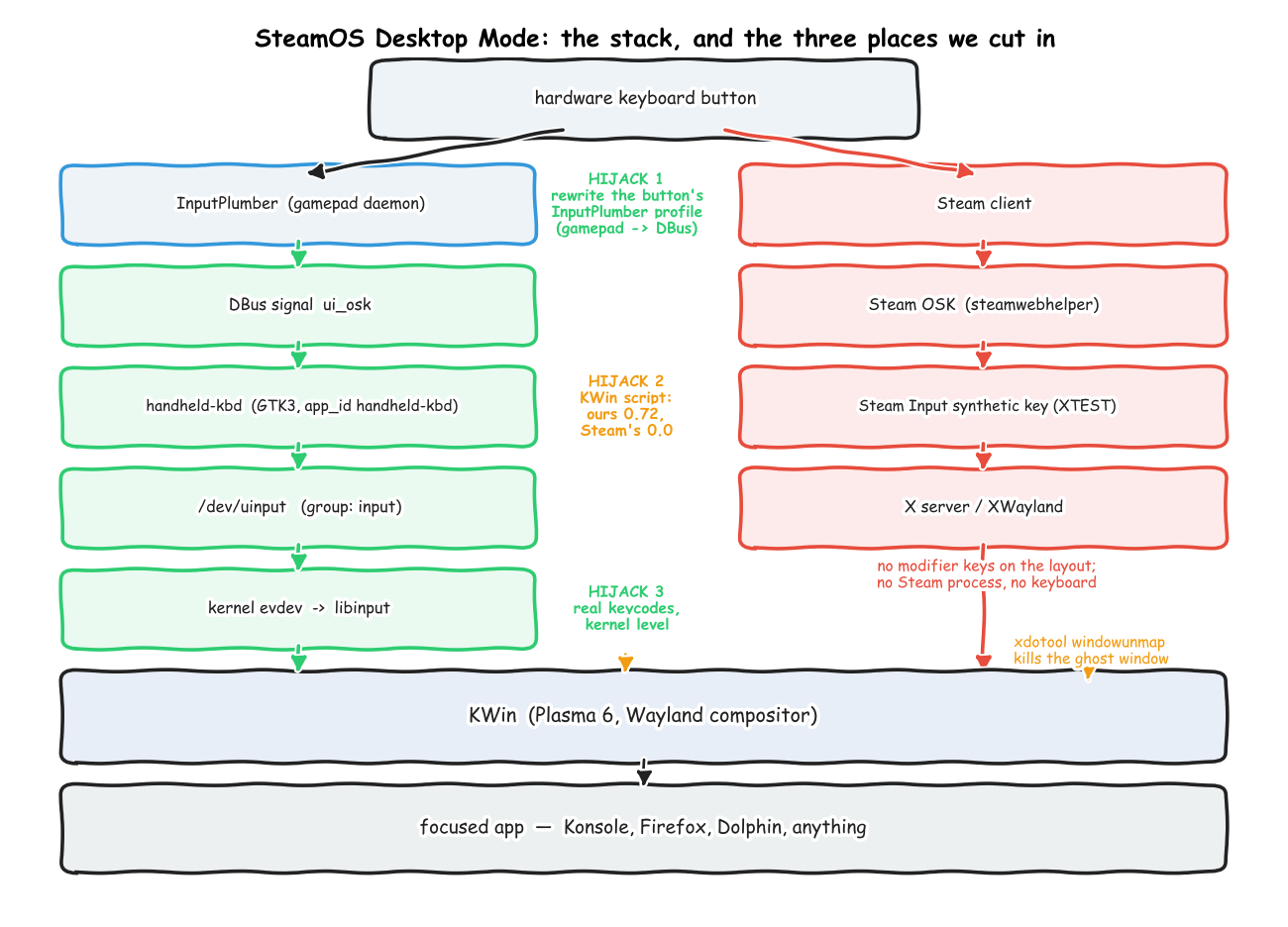
Three interception points:
1. The trigger. On handhelds running InputPlumber (the SteamOS gamepad daemon), the hardware keyboard button is a gamepad button mapped to Guide + North — the chord Steam listens for. I take InputPlumber’s current default profile, rewrite that one binding to emit a DBus event (ui_osk) instead, and load the modified profile over DBus per composite device:
busctl --system call org.shadowblip.InputPlumber "$dev" \
    org.shadowblip.Input.CompositeDevice LoadProfilePath s "$PROF"
No keystroke is emitted, so nothing else in the system reacts to the button. The keyboard subscribes to that DBus signal and toggles itself. The remap is built by string-replacing the exact block in /usr/share/inputplumber/profiles/default.yaml; if the block doesn’t match, the script bails rather than guessing.
2. The compositor. A KWin script (API reference) matches on window properties and sets opacity: handheld-kbd (our GTK app_id, set via GLib.set_prgname) to the configured value, default 0.72; Steam’s OSK to 0.0.
if (c.indexOf("handheld-kbd") !== -1) w.opacity = 0.72;
else if (cap.indexOf("Steam Input On-screen Keyboard") !== -1) w.opacity = 0.0;
The script is regenerated from config.json at daemon start, and the daemon re-checks every ~3s that it’s still loaded — the boot-time load loses the race against KWin startup often enough to matter.
3. The keys. /dev/uinput, as above, with a 20 ms settle between press and release (key_settle_ms) so modifier combinations land in order.
The ghost window
The default trigger mode doesn’t fight Steam, it rides it: the keyboard button still opens Steam’s OSK, KWin makes that invisible, and a daemon mirrors its visibility onto ours via SIGUSR1/SIGUSR2 on a 100 ms poll.
Opacity 0.0 is invisible, not gone — a fully transparent window still sits there swallowing every tap in its rectangle. Valve’s own bug compounds it: dismissing the OSK can leave an invisible window mapped and on top, blocking input to whatever is underneath (steam-for-linux#9099).
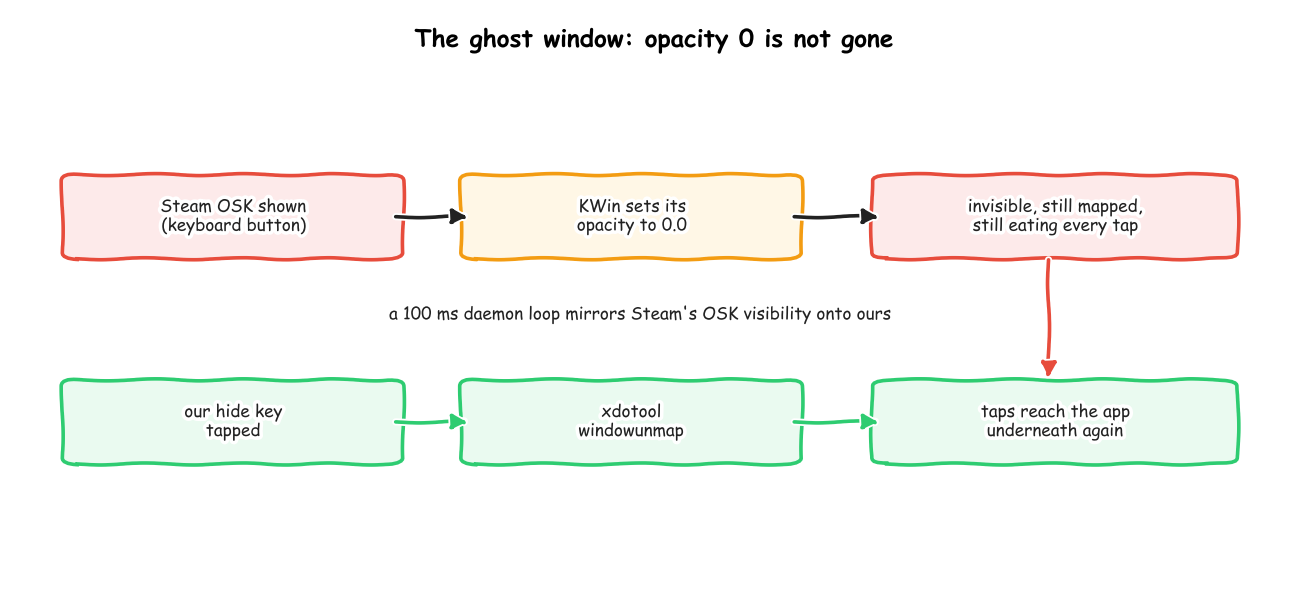
So the hide key sets a latch, and the daemon has xdotool windowunmap Steam’s OSK rather than just dimming it. Taps reach the app underneath again. The latch clears once the window is genuinely gone.
Two more failure modes worth naming, because both cost me an evening:
- Ghost typing. Two keyboard instances, both listening on the same DBus signal, both injecting — every keypress doubled. Fixed with a single-instance lock.
- A dead DBus subscription. The bus connection was being garbage-collected after setup, silently killing the subscription. The connection object is now held in a module-level list.
The daemon also watchdogs the keyboard process: its Wayland connection drops when Steam restarts or the compositor churns, so it’s respawned (throttled to once per 3s) instead of needing a reboot.
The result
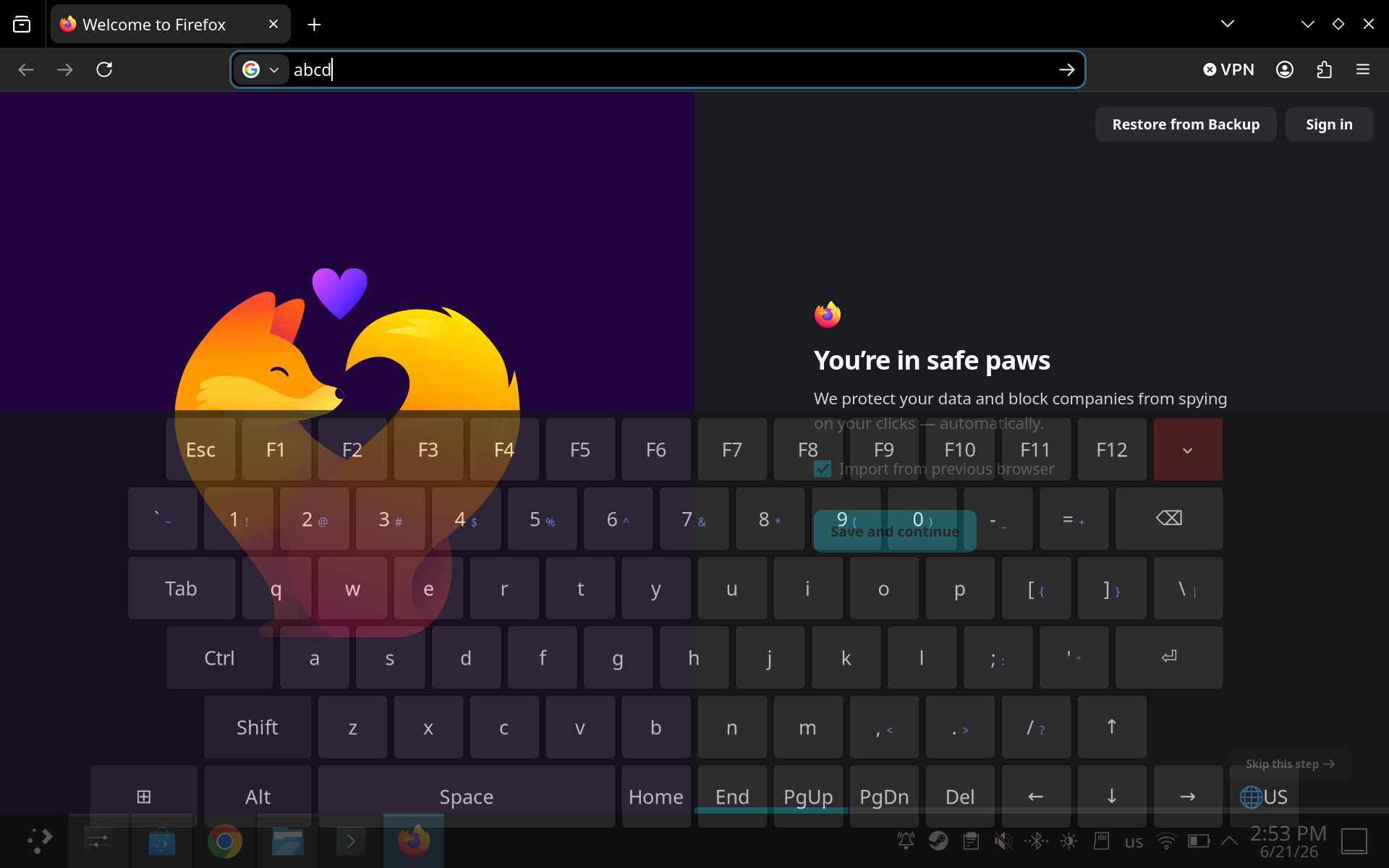
Translucent, full key set, US/UK layout switching via a 🌐 key that flips KDE’s XKB layout over org.kde.KeyboardLayouts DBus and re-skins the labels, so what’s printed and what’s typed stay in sync.
The transparency isn’t decoration. A Steam Deck is 1280×800; a Legion Go 2 is 1920×1200. A full-width keyboard eats the bottom third either way, and on those panels there are no pixels to spare — so you need to read the terminal output or the form field you’re typing into through the keys. Opacity defaults to 0.72 and is a number in config.json.
Layout, theme, key sizes, opacity and geometry are plain JSON in ~/.config/handheld-kbd/. Adding a key is a JSON object with a label and an evdev key name; unknown key names are skipped with a warning rather than taking the keyboard down.
The bottom row is Super, Alt, Space, PgUp, PgDn, Del, arrows, locale. No Home/End — they widened the row for navigation the arrow cluster and PgUp/PgDn already reach.
Install
Desktop Mode, KDE Plasma 6, Wayland session (default from SteamOS 3.8.10; on 3.7 it’s steamos-session-select plasma-wayland-persistent). Needs python3, python-gobject (GTK 3) and python-evdev.
git clone -b v1.0.11 https://github.com/AdamLovattDevOps/better-handheld-keyboard
cd better-handheld-keyboard
./install.sh   # then log out and back in
Or grab the latest release — the archives there bundle the optional suggestion filter, which a clone doesn’t.
Or double-click Install Better Handheld Keyboard.desktop. The log out is not optional — group membership for input is read at session start.
There’s an experimental gamescope-overlay path for Game Mode in the code, gated behind an env var. Desktop Mode is what I actually use it in.
Update: v1.0.0 took a Legion Go 1 user’s keyboard away
Within hours of release someone installed v1.0.0 on a Legion Go 1 and ended up with no on-screen keyboard at all — not mine, not Steam’s. Worth writing up, because the bug is a nice example of trusting a config file to describe hardware.
The installer picked between the two trigger modes like this:
grep -q 'button: Keyboard' /usr/share/inputplumber/profiles/default.yaml
Reasonable-looking, completely wrong. That file is InputPlumber’s generic default profile — it ships the same - name: Keyboard mapping on every device it supports. The grep answers “is InputPlumber installed”, not “does this handheld have a keyboard button”, so seamless mode got selected on hardware that can’t drive it.
The Legion Go 1 is exactly that hardware, and it’s sneaky about it. Its InputPlumber driver declares the capability:
// src/input/source/hidraw/legion_go.rs
Capability::Gamepad(Gamepad::Button(GamepadButton::Keyboard)),
but nothing ever emits it. The Go 1’s event set is Legion, QuickAccess, Y1/Y2/Y3, M2/M3, MouseClick — no keyboard button. Compare the Go 2, which has a real one:
// src/input/source/hidraw/legion_go2.rs
event::GamepadButtonEvent::ShowDesktop(value) => NativeEvent::new(
    Capability::Gamepad(Gamepad::Button(GamepadButton::Keyboard)),
So we rebound a button that physically does not exist. Then the second mistake turned a dead trigger into a dead desktop: the KWin script was generated with both rules in every mode, so Steam’s keyboard was still being forced to opacity = 0.0 — the fallback was suppressed by the thing that had already failed.
Why I never saw it: my Deck runs stock SteamOS, which doesn’t ship InputPlumber, so the grep failed and it landed in mirror mode. My Go 2 has the button. The two devices I tested on were the two that couldn’t reproduce it. The same trap catches a Deck or ROG Ally under Bazzite or ChimeraOS — neither driver references GamepadButton::Keyboard either.
v1.0.1 fixes it four ways:
- Detect the device, not the config. Seamless mode is now gated on DMI
product_name. I deliberately didn’t use InputPlumber’s DBusCapabilitiesproperty either — the Go 1 advertisesGamepad:Button:Keyboardthere too, so it would have reproduced the same false positive. - Fail visible, not dark. Steam’s keyboard is only made transparent once mine is known to appear: mirror mode qualifies by definition, seamless mode waits for a stamp file the keyboard writes the first time it’s really shown. A broken trigger now degrades to “the stock keyboard”, which is where the user started.
- Fall back at runtime. If the InputPlumber remap fails, the daemon drops to mirror mode for that session rather than leaving nothing.
- Fail loudly. The remap script used to end in
|| exit 0. It now reads theProfileNameproperty back after loading, warns when a device reports no keyboard button, and exits non-zero.
Plus a handheld-kbd-recover script and a double-clickable launcher for it — because “just run this command” is poor advice for someone whose only input method you broke. Re-running the installer repairs the same thing.
The lesson I’d keep: a capability advertised in a config file, or even over DBus, is a claim about software, not evidence about hardware. And when you suppress someone’s fallback, make the suppression conditional on your replacement actually working.
Update: hiding Steam’s keyboard cost the Deck its trackpads
A second report, and a better bug. On a Deck the keyboard came up fine but was touch only — moving a trackpad produced nothing, and the stick cursor was gone too. Only a Steam restart brought them back.
Mirror mode is the cause, or rather what mirror mode does to Steam’s keyboard. On a stock Deck the trigger is Steam’s own on-screen keyboard appearing; the KWin script sees that window map, summons mine, and hides Steam’s:
if (cap.indexOf("Steam Input On-screen Keyboard") !== -1) w.opacity = 0.0;
Invisible, but still mapped. Steam has no idea it’s invisible, and while Steam believes its keyboard is open it reassigns the controller. From its own log:
Set OSK active 1 and appid 413080
OnFocusWindowChanged On Screen Keyboard Forcing to window type: KB ActionSet, AppID 769
In the KB ActionSet, the sticks and trackpads navigate Steam’s keyboard instead of moving the desktop pointer. They were working perfectly — driving a keyboard nobody could see.
What made this expensive to find was how convincingly it pointed elsewhere. A bare uinput device emitting one keystroke, with no window and no KWin script, appeared to reproduce it; disabling focus restore and fullscreen lifting changed nothing; the fix looked like it had to be wlr-layer-shell or the virtual-keyboard protocol, neither of which SteamOS ships. I’d written most of a “this may not be fixable on the Deck” reply.
The measurement that killed all of it: XTEST, which is how Steam moves the pointer, worked in every state. Keyboard hidden, shown, after typing — xdotool mousemove_relative moved the cursor every time. The pointer path was never broken. Steam had just stopped driving it, which meant the answer was in Steam’s state, not in the input stack. Then the log said it outright.
v1.0.10 closes Steam’s keyboard rather than hiding it. Steam sets OSK-active back to 0, reloads the desktop controller config, and the pads are yours again. Closing it does mean Steam no longer reports the second button press as a close, so the hardware button is handled as a toggle in the compositor instead of mirroring Steam’s show and hide.
The lesson, which is roughly the same one as last time: a window you’ve made invisible is still a window, and the process that owns it is still reasoning about it.
Update: twenty languages, and how to know they’re right
v1.0.11 adds key labels for twenty layouts — English (US/UK), German, French, Spanish and Latin-American Spanish, Italian, Portuguese and Brazilian, Dutch, Polish, Turkish, Russian, Ukrainian, Greek, Arabic, Hebrew, Hindi, Thai and Vietnamese — plus an AltGr key, because most non-English layouts keep a third of their characters on the third level and without it Polish ą and Italian [ were simply unreachable.
The labels are the whole feature, and that’s the awkward part. The keyboard injects real keycodes, so what a key types was always decided by the OS layout: selecting Russian typed Cyrillic correctly while the keyboard drew q on the key that produces й. The gap was never in typing. It was the keyboard refusing to admit what the OS was doing.
Which raises the obvious problem. I can proofread Latin, and squint at Cyrillic and Greek. I cannot proofread Arabic, Hebrew, Devanagari or Thai, and “looks plausible” in a script you can’t read is worth nothing.
So none of it is hand-written. tools/build-locales.py generates the labels from xkeyboard-config’s symbol files and xorgproto’s keysymdef.h — the same data the OS uses. Writing a parser for that surfaced three bugs, each of which produced a layout that looked fine and was wrong:
- Braces inside comments. These files annotate keys with what they produce:
key <AB03> {[...]}; // ؤ }. My block scanner counted that}, so Arabic ended after three keys and quietly lost the other seven — an Arabic keyboard withv b n min Latin. - Deprecated keysym aliases. Resolution went through each name’s
U+comment, but several names share a code and only one carries it; the rest read “deprecated alias for guillemetleft (misspelling)”. That lostmasculineandguillemotleft— and since a key whose first level doesn’t resolve gets dropped entirely, Spanish lost itsºkey outright rather than just a label. - Type declarations.
key <AD08> { type[group1] = "FOUR_LEVEL_ALPHABETIC", [ i, I ] }— that first bracket isn’t a symbol list. Taking it lost Turkish’s dotted and dotlessi, which is the one character Turkish cannot afford to lose.
Three silent wrong-layout bugs is enough to stop trusting the parser, so every label is checked against a different implementation: xkbcli compile-keymap, i.e. libxkbcommon, which is what the compositor itself will use. 940 key/level pairs across the twenty, zero mismatches, re-run in CI on every push.
That’s still only agreement between two descriptions of a keyboard. So each language also gets typed: switch the OS layout, open Kate, type that language’s pangram through /dev/uinput using key positions read from the shipped locale data, press Ctrl+S, and compare the saved file byte for byte.
Съешь же ещё этих мягких французских булок да выпей чаю
نص حكيم له سر قاطع وذو شأن عظيم
Pijamalı hasta yağız şoföre çabucak güvendi
Two things fell out of that which no amount of reading the data would have found.
With only non-Latin layouts loaded, Ctrl+S stops working. Every save under ru ua gr ara silently did nothing. Application shortcuts are bound to Latin keysyms, so under a Cyrillic keymap the S key produces Cyrillic_yeru and Kate’s Save never fires — Ctrl+C and Ctrl+V go the same way. KDE’s Latin fallback covers global shortcuts, not an application’s own. Adding us to the group made all four pass unchanged. Since only four layouts can be live at once, that’s a choice a user can get wrong, so the picker warns.
One character out of twenty languages went in and didn’t come back. I’d appended each layout’s currency symbols to its pangram, because most sit on AltGr and it’s a cheap way to exercise the new key. Russian ₽ vanished:
key <AE08>  { [ 8, asterisk, U20BD, NoSymbol ] };   # rouble on level 3
key <RALT>  { [ Alt_R ] };                          # …and nothing reaches level 3
The label matched the keymap perfectly. The keymap was making a promise it couldn’t keep — a layout can define third-level symbols and bind no AltGr switch. So the generator now only emits level-3 labels for layouts that provide one, and CI fails a locale that claims otherwise.
Also worth knowing: only four layouts can be live at once. That’s the keymap format, not a setting — ask libxkbcommon for a fifth and it says Unrecognized RMLVO layout "es" was ignored. Twenty sets of labels ship; which four are in rotation is a tray-menu checklist and a logout.
The through-line, if there is one: I couldn’t verify this by looking at it, so I had to build something that could. That turned out to be worth more than the feature.
Tested on a Steam Deck (1280×800) and a Legion Go 2 (1920×1200), and — since v1.0.1 — repaired on a Legion Go 1 by the user who found the bug. The InputPlumber remap is the only device-specific part; the default mirror mode works without it.
Every release since, and what broke in each: release history.
Sources: PCGamesN on the Desktop Mode keyboard · steam-for-linux#9099 (invisible window blocks input) · steam-for-linux#10632 (Steam Input on Wayland) · SteamOS 3.8.10 release notes (Plasma 6.4.3, Wayland default)